NURBS - Parabolic Mirror
Author: Matteo Taccola
This example shows how to use the NURBS geometry without passing explicitly the parameters that define the NURBS (control points, weights etc). If a radius (and optionally a conic constant) are defined and no control points are passed the NURBS is generated as a surface approximation of the base conic. Please note that this can be easily expanded to the fitting of every other possible surface (asphere,zernike etc.)
[1]:
from optiland.geometries import NurbsGeometry
[2]:
from optiland import analysis, optic, optimization
from optiland.coordinate_system import CoordinateSystem
from optiland.materials import IdealMaterial, Material
from optiland.surfaces import Surface
import optiland.backend as be
Generate NURBS reflector approximating parabola surface
Surface parameters
[3]:
radius = -100.0
conic = -1
Coordinate system
[4]:
cs = CoordinateSystem(x=0, y=0, z=0, rx=0, ry=0, rz=0, reference_cs=None)
Generate geometry. if control points are passed radius and conic are ignored and the surface is built as NURBS from control points and weights. In this case we pass a base conic profile (parabola). The surface is generated deriving a grid of control points (in this case a 7x7 grid)
[5]:
nurbs_geo = NurbsGeometry(
    coordinate_system=cs,
    radius = radius,
    conic=conic,
    n_points_u = 7,
    n_points_v = 7,
)
Generate surface. Both materials pre and post are air
[6]:
material_pre = IdealMaterial(n=1.0)
material_post = IdealMaterial(n=1.0)
[9]:
new_surface = Surface(
    geometry=nurbs_geo,
    material_pre=material_pre,
    material_post=material_post,
    is_stop=True,
)

# Change interaction model to reflective
new_surface.interaction_model.is_reflective = True
[11]:
lens = optic.Optic()

# add surfaces
lens.surfaces.add(index=0, radius=be.inf, thickness=be.inf)
lens.surfaces.add(
    index=1,
    new_surface=new_surface,
    thickness=-50,
)
lens.surfaces.add(index=2)

EPD = 20.0  # entrance pupil diameter

# add aperture
lens.set_aperture(aperture_type="EPD", value=EPD)

# add field
lens.fields.set_type(field_type="angle")
lens.fields.add(y=0)

# add wavelength
lens.wavelengths.add(value=0.55, is_primary=True)

lens.update_paraxial()  #This is needed to assign the NURBS aperture and perform the surface fitting

_ = lens.draw(num_rays=10)
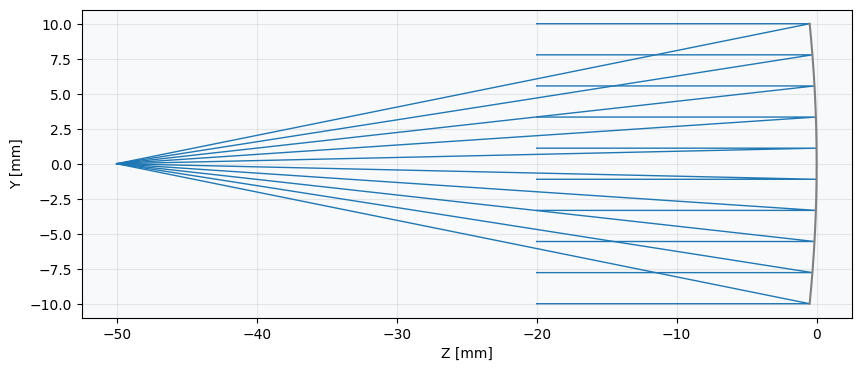
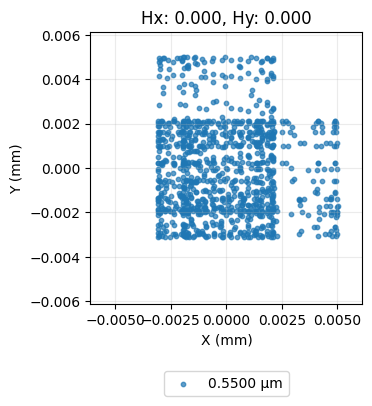
Check that the spot is a ‘point’ as expected from a parabola. Deviations from a point are linked to surface fit accuracy.
[12]:
spot = analysis.SpotDiagram(lens,num_rings=18)
_ = spot.view()
Let’s introduce a decenter to have an off axis parabola
[13]:
dy = 20
[14]:
lens.surfaces.surfaces[1].geometry.cs.y = dy
The function fit_surface defines the NURBS parameters that fit the surface profile on a rectangular aperture with center (x_center, ycenter) and sides \(2*norm_x\) and \(2*norm_y\). Since the decenter of the parabola is dy a new fit of the surface should be performed with y_center = -dy
[15]:
lens.surfaces.surfaces[1].geometry.y_center = -dy
Call fit_surface function to compute again control points and weights that approximate the parabola
[16]:
lens.surfaces.surfaces[1].geometry.fit_surface()
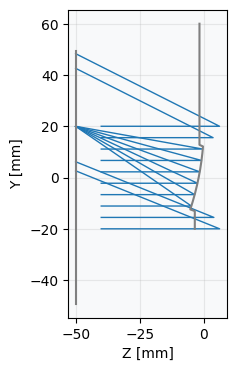
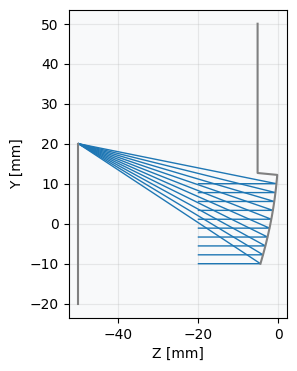
Draw lens. Note how the NURBS surface doesn’t fit the parabola in the region outside the optical aperture where the fit was not performed.
[18]:
_ = lens.draw(num_rays=10)
[19]:
spot = analysis.SpotDiagram(lens,num_rings=18)
_ = spot.view()
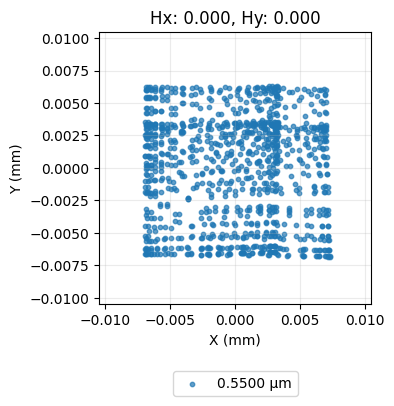
To verify that the surface outside the fit area is ‘uncontrolled’ let’s increase the beam aperture and trace more rays. The rays outside the fitted area follows ‘uncontrolled’ reflection
[20]:
lens.set_aperture(aperture_type="EPD", value=2.0*EPD)
[21]:
_ = lens.draw(num_rays=10)