Tutorial 4d: Lens Catalogue Integration
Consolidating off-the-shelf catalog lens selection from Edmund Optics and Thorlabs catalogs.
This tutorial shows how to retrieve optical components from the Edmund Optics lens catalogue. In particular, we cover:
How to open Zemax files in Optiland
How to retrieve and analyze an aspheric lens from the Edmund Optics catalogue
Optiland uses the function load_zemax_file to load a Zemax (.zmx) files into the Optiland format. The function accepts either a file directly or a URL link to the file. If a URL is provided, Optiland downloads the file prior to extracting the lens data.
[1]:
from optiland import analysis
from optiland.fileio import load_zemax_file
File retrieval
For this example, we will use a 15 mm Dia., 0.33 Numerical Aperture Uncoated, Aspheric Lens. We pass the filename of the downloaded .zmx file to our load_zemax_file function:
[2]:
filename = "zmax_47728.zmx"  # downloaded from link above
lens = load_zemax_file(filename)
The function directly returns an instance of an Optiland Optic class. We can draw the lens as shown.
[3]:
lens.draw()
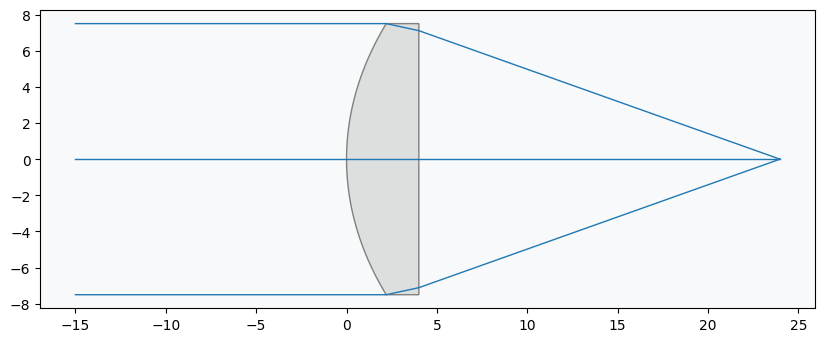
We also print an overview of the lens data. This currently excludes the aspheric coefficients.
[4]:
lens.info()
+----+---------------------+----------+-------------+------------+----------+-----------------+
|    | Type                |   Radius |   Thickness | Material   |    Conic |   Semi-aperture |
|----+---------------------+----------+-------------+------------+----------+-----------------|
|  0 | Planar              |  inf     |    inf      | Air        |  0       |     7.5         |
|  1 | Stop - Even Asphere |   13.255 |      4      | L-BAL35    | -2.36414 |     7.5         |
|  2 | Planar              |  inf     |     19.9823 | Air        |  0       |     6.66094     |
|  3 | Planar              |  inf     |    nan      | Air        |  0       |     2.66454e-15 |
+----+---------------------+----------+-------------+------------+----------+-----------------+
Lens Analysis
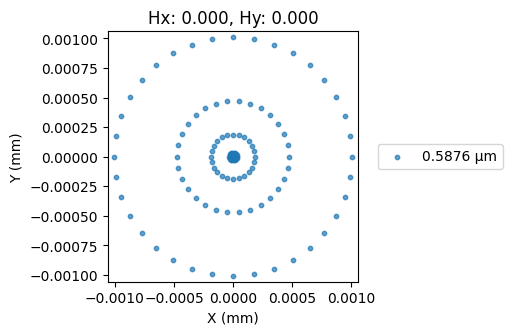
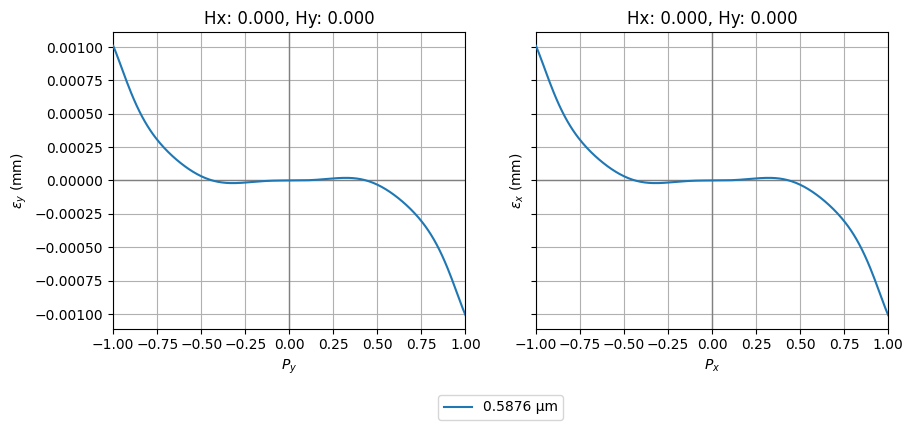
To assess performance, we generate a spot diagram and the ray aberration fans:
[5]:
spot = analysis.SpotDiagram(lens)
spot.view()
[6]:
fan = analysis.RayFan(lens)
fan.view()
Conclusions
This tutorial showed how to retrieve and analyze an Edmund Optics catalogue lens.
The load_zemax_file function does not currently support all Zemax surface types and may fail to convert a lens into an Optiland Optic instance in some cases. Users are encouraged to create an issue on the GitHub page if an error occurs.
Part 2: Thorlabs Catalogue
This tutorial shows how to retrieve optical components from the Thorlabs lens catalogue. Building on the previous tutorial, we will show:
How to retrieve a lens model directly from the Thorlabs website
How to modify the lens properties after retrieval
[1]:
import matplotlib.pyplot as plt
import numpy as np

from optiland import analysis
from optiland.fileio import load_zemax_file
File retrieval
As mentioned in the previous tutorial, the load_zemax_file function can accept either a Zemax (.zmx) file directly or a URL link to the file. Here, we will use the a Thorlabs Matched Achromatic Pair Lens and we will pass the URL directly to ZemaxFileReader. Optiland will download the file prior to reading the .zmx file.
[2]:
# link to the .zmx file on Thorlabs website
url = "https://www.thorlabs.com/_sd.cfm?fileName=20565-S03.zmx&partNumber=MAP051950-A"

lens = load_zemax_file(url)
We then draw the lens.
[3]:
lens.draw()

Let’s print an overview of the lens data:
[4]:
lens.info()
+----+---------------+----------+-------------+------------+---------+-----------------+
|    | Type          |   Radius |   Thickness | Material   |   Conic |   Semi-aperture |
|----+---------------+----------+-------------+------------+---------+-----------------|
|  0 | Planar        |   inf    |    16.3412  | Air        |       0 |        0.413735 |
|  1 | Standard      |    59.26 |     1.5     | N-SF6HT    |       0 |        4.633    |
|  2 | Standard      |    11.04 |     4.5     | N-BAF10    |       0 |        4.73714  |
|  3 | Standard      |   -12.94 |     2       | Air        |       0 |        5.23109  |
|  4 | Stop - Planar |   inf    |     1.98331 | Air        |       0 |        5.05599  |
|  5 | Standard      |    27.36 |     3.5     | N-BK7      |       0 |        5.19763  |
|  6 | Standard      |   -22.54 |     1.5     | SF2        |       0 |        5.13588  |
|  7 | Standard      |   -91.83 |    41.7305  | Air        |       0 |        5.13866  |
|  8 | Planar        |   inf    |   nan       | Air        |       0 |        3.75398  |
+----+---------------+----------+-------------+------------+---------+-----------------+
Lens Analysis
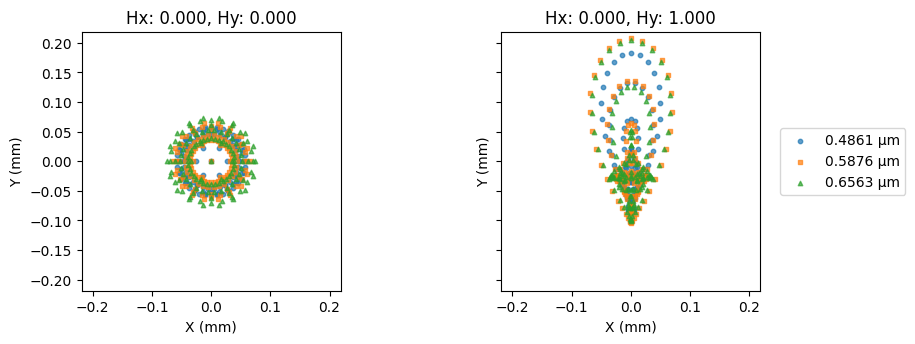
Let’s plot the nominal spot diagram:
[5]:
spot = analysis.SpotDiagram(lens)
spot.view()
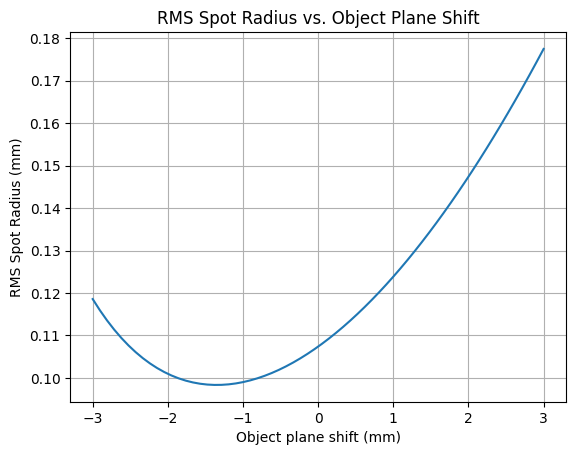
The lens is designed for finite conjugate applications. As an exercise, let’s monitor the RMS spot size as a function of the object position. As we shift the object plane, we will reposition the image plane to the paraxial image location. We will use the on-axis field point (index=0) and the central wavelength (index=1).
[6]:
# we will shift the object plane by ±3.0 mm from the nominal location
dz = np.linspace(-3.0, 3.0, 64)

# thickness between the object surface and the first lens surface
thickness = dz + 16.3412  # nominal location = 16.3412 mm

# set the wavelength and field indices
wavelength_idx = 1
field_idx = 0

# initialize variables
rms_spot_radius = []

for z in thickness:
    # change thickness on the first surface
    lens.updater.set_thickness(value=z, surface_number=0)

    # move image plane to maintain focus
    lens.image_solve()

    # generate spot diagram data
    spot = analysis.SpotDiagram(lens)

    # calculate RMS spot radius
    rms_spot_radius.append(spot.rms_spot_radius()[field_idx][wavelength_idx])
[7]:
plt.plot(dz, rms_spot_radius)
plt.xlabel("Object plane shift (mm)")
plt.ylabel("RMS Spot Radius (mm)")
plt.title("RMS Spot Radius vs. Object Plane Shift")
plt.grid()
plt.show()
Conclusions
This tutorial showed how to retrieve and analyze a Thorlabs catalogue lens.
We modified the lens properties and assessed the RMS spot size of the on-axis field as a function of the object plane shift. We compensated for the object shift by repositioning the image plane to the paraxial image location.