
Conventions#
This page explains the model every Optiland lens is built on. Read it once and the rest of the tutorials stop needing to re-explain it. It answers the question newcomers hit first: why does a lens look like a list of surfaces, and what do these surface parameters actually mean?
The Surface-Sequential Model#
An Optiland Optic is not a list of lenses — it is a list of surfaces. A single glass
lens element is therefore two surfaces (front and back), not one:
lens = optic.Optic()
lens.surfaces.add(index=0, thickness=float("inf"))                     # object
lens.surfaces.add(index=1, radius=50.0, thickness=5.0, material="N-BK7", is_stop=True)
lens.surfaces.add(index=2, radius=-50.0, thickness=40.0)                # back of the lens
lens.surfaces.add(index=3)                                              # image
Rays are traced through surfaces in index order, refracting or reflecting at each interface in turn. Everything else in Optiland — aberration analysis, optimization, tolerancing — operates on this same ordered surface list.
The “After” Rule#
This is the single most common source of confusion for newcomers, so read it twice:
A surface’s ``thickness`` and ``material`` describe the space that follows it — not the space before it.
When you write lens.surfaces.add(index=1, thickness=5.0, material="N-BK7"), you are not
describing surface 1 itself; you are describing the 5 mm of N-BK7 glass that lies between
surface 1 and surface 2.
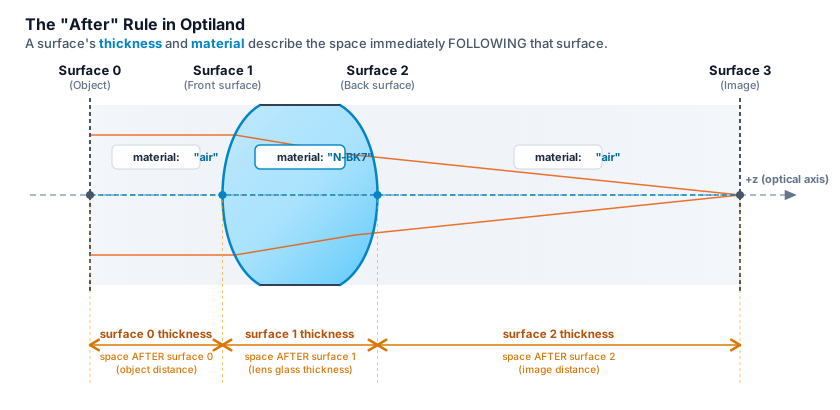
Surface 0’s thickness is the object distance — the space between surface 0 and surface 1.
Surface 1’s thickness and material describe the glass between surface 1 and surface 2.#
A practical consequence: the material you pass to surfaces.add() for surface N is the glass
inside the lens element that surface starts, and the surface that closes that element (the
next one) is normally left at the default "air".
Index 0 Is the Object; the Last Index Is the Image#
Surface 0 is always the object surface. For an object at infinity, give it an infinite thickness (
thickness=float("inf")); for a finite conjugate, use the actual object distance.The last surface is always the image surface. Optiland does not require you to mark it explicitly — it is inferred from position in the list.
Surfaces must be added in index order, starting from 0. Trying to add index 3 before index 1 exists raises an
IndexErrornaming the current surface count and the valid range.
Sign Conventions#
Propagation direction: light travels left to right, along the +z axis.
Radius of curvature: positive means the center of curvature lies to the right of the surface (in the direction of propagation) — a convex surface facing the incoming beam has a positive radius. Negative means the center of curvature lies to the left. A flat surface has an infinite radius (
float("inf")).Thickness: positive means the next surface lies further along +z (the normal case). Each
is_stop=False-style reflective surface (a mirror,material="mirror") flips the sign of every thickness that follows it, since propagation now runs the other way along z. A system with one mirror has negative thicknesses after it; a system with two mirrors (e.g. a Cassegrain) returns to positive thicknesses after the second one. This is whyoptiland.diagnostics.check_system()tracks the number of reflective surfaces seen so far before flagging a thickness sign as unexpected, rather than simply requiring every thickness to be positive.Tilts and decenters: rotations are applied in the order
R = Rz @ Ry @ Rxabout the surface’s local coordinate system, applied before translation.
Units#
Stated once, so no tutorial has to restate it:
Quantity |
Unit |
|---|---|
Lens dimensions |
millimeters (mm) |
Wavelengths |
microns (µm) |
Angles |
degrees |
A system needs at least one wavelength, and exactly one of them must be marked
is_primary=True — it is the one used for paraxial calculations and single-wavelength
analyses. Catalog materials (loaded from refractiveindex.info)
carry a finite dispersion data range in microns; a wavelength that falls outside a material’s
range produces unreliable index data, which is why
optiland.diagnostics.check_system() warns about it rather than staying silent.
Stop, Aperture, and Pupil#
These three terms are related but distinct, and newcomers routinely merge them:
Stop: a physical surface in your system, marked with
is_stop=True. It is the surface that limits the cone of rays passing through the system for an on-axis field point. Marking the object or image surface as the stop is almost always a mistake.Aperture: the system-level specification of how large that cone is —
lens.set_aperture(aperture_type="EPD", value=25)sets it via entrance pupil diameter, but it can also be specified via image-space f-number ("imageFNO") or object-space numerical aperture ("objectNA"). A system needs exactly one stop surface and one aperture definition;optiland.diagnostics.check_system()flags either being missing or a stop placed on the object or image surface.Pupil: the image of the stop as seen from object space (entrance pupil) or image space (exit pupil). It is a derived, computed quantity — you never set a pupil directly, only the stop and the aperture that determines its size.
Field Specification#
A field describes where on the object (or in what direction) a bundle of rays originates:
Field type —
lens.fields.set_type("angle")for angular fields (object at infinity, most common for imaging lenses) or"object_height"for a field specified as a physical height on a finite-conjugate object.Adding a field —
lens.fields.add(y=10.0)for a single field;xandyfollow the same units as the field type (degrees for angle, mm for object height).Normalized coordinates (Hx, Hy) — internally, ray tracing and analysis methods (
lens.trace(Hx, Hy, wavelength)) take normalized field coordinates in[-1, 1], where 1 corresponds to the maximum field defined on the system. Uselens.fields.get_field_coords()to convert your defined fields into this normalized form.
Still stuck on a specific error? Run optiland.diagnostics.check_system() on your Optic —
it names the offending surface or object and gives you a runnable fix.